How the JWorld team ships one small game in 12 languages: picking the language, fonts, overflow checks and translation rules, all taken from our own working standard.
Translation looks like a text job. In a small game, the screen breaks before the sentence does. A German button is longer than its Korean twin, Thai stacks marks above and below the line, and Vietnamese carries so many accents that a font without them shows holes.
Since 22 October 2026 the JWorld team ships every game in 12 languages by default. This dev note unpacks that standard (our internal I18N.md): which languages we support, what we translate and what code handles for us, and what we check before release.
The 12 languages
Korean is the source text and English is the fallback. The other ten are below.
| Code | Language | Name in the language menu | Script |
|---|---|---|---|
| ko | Korean | 한국어 | Hangul |
| en | English | English | Latin |
| ja | Japanese | 日本語 | Kana + kanji |
| zh-Hans | Simplified Chinese | 简体中文 | Han (simplified) |
| zh-Hant | Traditional Chinese | 繁體中文 | Han (traditional) |
| es | Spanish | Español | Latin |
| pt-BR | Portuguese (Brazil) | Português (Brasil) | Latin |
| de | German | Deutsch | Latin |
| fr | French | Français | Latin |
| id | Indonesian | Bahasa Indonesia | Latin |
| th | Thai | ไทย | Thai |
| vi | Vietnamese | Tiếng Việt | Latin + many diacritics |
Some languages are left out for now. Arabic and Hebrew run right to left, which means redesigning layouts, so they wait. Hindi and Russian are not on the list yet either.
The language menu writes each name in its own script and uses the device's default font, so it needs no extra glyphs. Someone who cannot read English can still spot "日本語" or "ไทย".
How the game picks a language
A game does not ask you to choose when it opens. It decides in this order:
- The language the player picked in Settings
- The language reported by the platform (a portal or app environment)
- The first match in the browser's language list (
navigator.languages) - English, if nothing matched
One small rule matters here. If the list starts with a tag outside the 12, the game skips it instead of turning it into English. With a browser set to "Russian, then Japanese", the game lands on Japanese, not English, because the Russian entry is skipped and the next candidate still counts.
Tags are folded into the 12 like this:
| Incoming tag | Language chosen |
|---|---|
| zh-TW, zh-HK, zh-MO, zh-Hant | Traditional Chinese |
| any other zh | Simplified Chinese |
| anything starting with pt | Brazilian Portuguese |
| id, in | Indonesian (Android still uses the old code in) |
| a language not in the 12 | English |
One trap we hit: a game that once had a two-chip Korean/English switch may hold a saved en that nobody chose. So a saved language counts only if the player actually picked it. Otherwise the game follows the device.
Sentences get translated; numbers and dates get formatted
Game code uses the Korean sentence as the key. Calling t('한국어 원문') looks the string up in the active language's dictionary. Each language has its own file (i18n-en.ts, i18n-ja.ts … i18n-vi.ts). Lookup falls back from the language to English, then to Korean.
The rules for whoever translates:
- Translate from the Korean, with the English next to it as a reference. The English shows the intended meaning and tone.
- Keep placeholders such as
{n}exactly as they are. - The game name is a brand, so it stays in Latin letters, unless the glossary gives a local title.
- Each game keeps a glossary (
GLOSSARY.md) so that "parts", "enemies" and "currency" use the same word on every screen.
Numbers and dates are not translated at all. Intl.NumberFormat and Intl.DateTimeFormat write them for each language, and code never glues a word to a number.
We avoid plurals where we can: a label style like "Balls: 6" needs none. Where a sentence truly needs one, we write {n:one|other}, and only English, Spanish, Portuguese, German and French may use it. Japanese, Chinese, Thai, Vietnamese and Indonesian have no plural forms. A test enforces this.
What we draw instead of translating
Text baked into an image cannot be reached by a dictionary: title logos, cover art, AI pictures with lettering. Our rule gives two options:
- make a separate image per language, or
- make the image text-free and draw the title in code.
The two screens below are the home screen of Frame Breaker. On the English home screen the title is a Latin wordmark, and the bottom row reads Workshop, Daily Run and Catalogue. On the Thai home screen the same layout holds Thai labels.
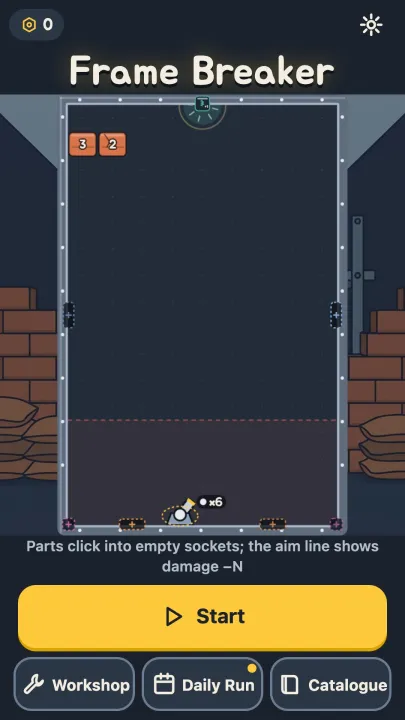
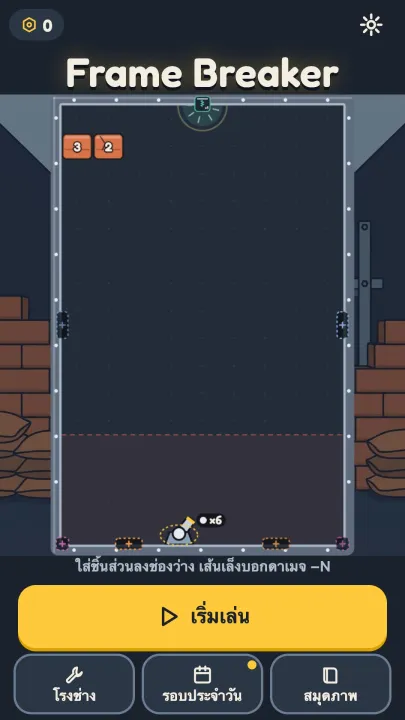
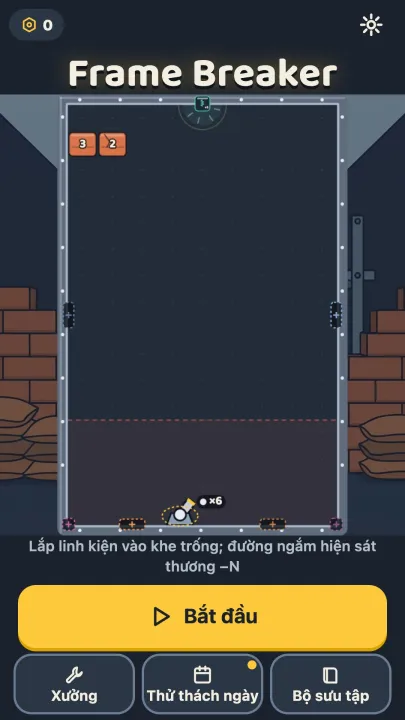
One name can differ a lot in length. The Korean "오늘의 판" is "Daily Run" in English and "Thử thách ngày" in Vietnamese. When one key is used on several screens, we judge it at its narrowest place. A key for the daily contract was both a nav label and a title; the Vietnamese "Hợp đồng hằng ngày" wrapped in the nav, so we shortened it to "Hợp đồng ngày".
Fonts: the glyphs have to exist first
A finished translation can still show nothing readable. Our rule: each language gets a font that contains every glyph that language shows. No silent fallback to a random system font in the middle of a word. Vietnamese accents and Thai marks are where it breaks first.
A game uses few characters, so we cut fonts down to subsets that keep only the characters used. A tool (pyftsubset) reads the dictionaries and writes a WOFF2 with just those glyphs. The target is 150 KB or less per language. The first game to use the standard, Frame Breaker, ended up with these:
| Language | Font | Subset size |
|---|---|---|
| Japanese | M PLUS Rounded 1c ExtraBold | 72 KB |
| Simplified Chinese | ZCOOL KuaiLe | 45 KB |
| Traditional Chinese | Huninn | 89 KB |
| Thai | Mitr Medium | 13 KB |
| Latin group (es, pt-BR, de, fr, id, vi) | Baloo 2 Bold | 20 KB, one file for six languages |
Korean and English keep the Jua subset they already had. Jua has no accented letters, so Spanish, French and Vietnamese move to Baloo 2.
A few lessons came the hard way:
- Thai and Vietnamese need a line height around 1.4 to 1.5, or stacked marks are clipped. In a fixed-height pill,
line-height: 1cut Thai digits. - Display fonts draw digits differently. Some slant them, some slash the zero. We put a round Latin font (Fredoka) first in that language's stack so the numbers match everywhere.
- Only the active language's font is loaded. Preloading one language's font for everyone makes every other player download it for nothing.
- Japanese must not use the Korean font stack. Korean system fonts include Hanja, so kanji can come out in a Korean style next to kana from another font.
Let a machine find the overflow
Eyes alone cannot cover every screen in 12 languages. The command npm run shots:i18n drives a headless browser through every screen × 12 languages × 3 sizes: 375×667, 360×526 (Android with the address bar showing) and 1280×720.
An automatic report flags:
- text boxes wider or taller than their container (
scrollWidth > clientWidth) - canvas text that shrank all the way to its floor
- a language whose display font did not actually load
- a box pushed out of its card even when its own text fits (Portuguese "Configurações" once stuck out of a desktop panel)
It also builds contact sheets with the 12 languages side by side, and a person opens them. Every 360×526 sheet must be opened, since that is the tightest size. Twice an agent opened only the "main flows" when told to open every sheet, so the report must now list which sheets were opened.
After each web deploy we check once more. Every .woff2 must answer 200 through curl, and in the Japanese and Thai runs document.fonts.check() must be true. A deploy once left font files out, and screenshots still looked fine because the browser quietly drew system fonts.
Layout problems that keep coming back
| Symptom | Fix |
|---|---|
Button text cut with … | outside ko and en, let the label wrap to two lines |
Long German word (Sicherheitsnetz) overflows | hyphens: auto with the right lang; overflow-wrap: anywhere as a last resort |
| A Japanese compound breaks in an awkward place | insert a zero-width space (U+200B) where it may break |
| Thai has no spaces, so canvas text cannot wrap | split into words with Intl.Segmenter('th') |
| A rule name like "3-3" breaks after the hyphen | join the digits with a non-breaking hyphen (U+2011) |
Items joined with , | a helper uses 、 for Japanese and Chinese |
The principle is simple. When text does not fit, the layout gives way, not the translation. We keep button labels within the English length plus 30%, and if a word will not shrink, the layout changes.
Summary
- Since 22 October 2026 the JWorld team ships every game in 12 languages: Korean, English, Japanese, Simplified and Traditional Chinese, Spanish, Brazilian Portuguese, German, French, Indonesian, Thai and Vietnamese.
- The language is chosen as saved choice, platform language, browser list, then English, and tags outside the 12 are skipped.
- Sentences are translated with the Korean as the key; numbers, dates and plurals come from
Intl; text in images is made per language or drawn in code. - Fonts are per-language subsets with only the needed glyphs, and only the active language's font loads.
- Every screen in 12 languages and 3 sizes is photographed automatically to catch overflow, and after a deploy we confirm the font files really arrive.
To see all 12 for yourself, open the language menu in the settings of Frame Breaker. You can play it on the web right away.
Written by the JWorld team from our game design documents and measured play data, with AI tools helping with the writing.