Stars in Stitch Hoop come from planning ahead: which side's needle to tap, and what to park on the pincushion. How needles move, how the pincushion works, the star rules and the special needles.
Stitch Hoop is a puzzle where you tap needles from four thread trays around a hoop and stitch a picture onto the cloth, one stitch at a time. There is no timer and no score pressure. But every needle sweeps only its own side, so tapping at random fills the pincushion fast.
We made the game, so this guide uses the real rules and star conditions to explain how to plan ahead.
How a needle moves
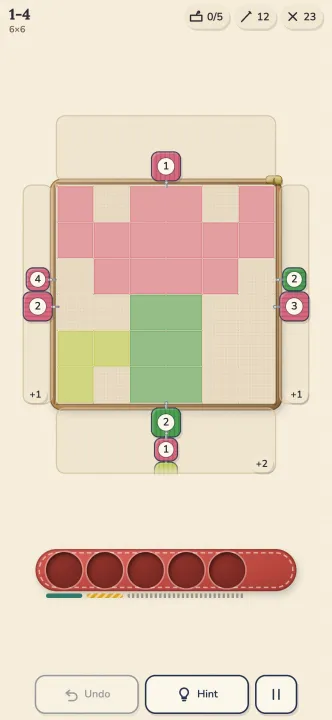
The rules are short.
- Each tray holds a line of needles, and only the front two can be tapped.
- A tapped needle makes one pass along its own side of the cloth. From a top tray it looks down each column; from a left tray it looks along each row.
- On every line, it finds the first unstitched square counted from the edge. If that square matches the needle's color, the needle stitches it. If not, the needle passes by.
- The number on a needle is its remaining stitches. Each stitch uses one, and at zero the needle is gone.
- A needle that still has stitches left, or that stitched nothing, goes to the pincushion.
That is why a picture peels from the outside in: an inner square only becomes reachable once the squares in front of it are stitched. The three counters at the top show, from the left, pincushion use (0/5), needles left and stitches left.
Press and hold to preview
While you press a needle, the squares it would stitch get a ring and the tray's rail glows. Let go to commit, or drag away to cancel. This is the Show targets on press setting, and it is on by default.
When a board is new to you, press each front needle once and just read the previews. On a computer, hovering with the mouse does the same. Keyboard keys: Z undo, H hint, Esc pause, and 1 to 4 for the front needle of each side.
The pincushion is a planning tool, not a trash can
The pincushion has 5 slots. If it is full and the needle you tap would still have stitches left, the tap is refused: you get a shake and "Pincushion full", and nothing changes. If no legal move remains at all, a Stuck sheet appears. It offers undo or try again, and it never shows an ad.
Three ways to use it well:
- Park on purpose. A needle that stitches nothing goes onto the cushion, so you can use it to clear a blocking needle from the front of a tray.
- Parked needles leave from the best side. When you tap a parked needle, it goes out from the side where it would stitch the most. If it would stitch nothing, the tap is refused. So park a needle until the squares it needs are exposed, then use it.
- Keep an exit. On big boards the last one or two slots are your emergency room. Before you fill the final slot, check that you still have a move.
Which side, which needle?
The real decision is when two needles of the same color can both go. Check these in order.
| Check | Why it matters |
|---|---|
| How many stitches does it make now? | More stitches empties the needle sooner and frees its tray |
| What does it expose? | Newly exposed squares need a matching needle near the front |
| Will it end up on the cushion? | Leftover stitches cost a slot |
| Is the second needle better than the first? | Using the front needle brings the next one forward |
The habit that pays most is asking "if I tap this, which needle comes forward?" Each tray's order is fixed, so using a front needle also pulls the next one into reach.
Three stars: Finished, Tidy, Spotless
| Star | Name | Condition |
|---|---|---|
| 1 | Finished | Clear the board |
| 2 | Tidy | Peak pincushion use at most the minimum plus 1 |
| 3 | Spotless | Peak pincushion use at most the minimum, with no undo, hint or extra slot |
The minimum comes from a solver, so a third star is always reachable. In game the goals read "Tidy: pincushion n or fewer" and "Spotless: n or fewer, no undo".
You get 2 free undos per level, and a rewarded ad can add 3 more while the board is not stuck. If you are after Spotless, play your first attempt without undo. If it goes wrong, settle for Tidy, then come back for the clean run.
The three special needles
| Needle | Movement | First appears |
|---|---|---|
| Twin (x2) | Sweeps out and back, up to 2 stitches per line | World 2, level 6 |
| Corner | Sweeps its side, then the next side clockwise | World 3, level 5 |
| Round | Sweeps all four sides | World 4, level 4 |
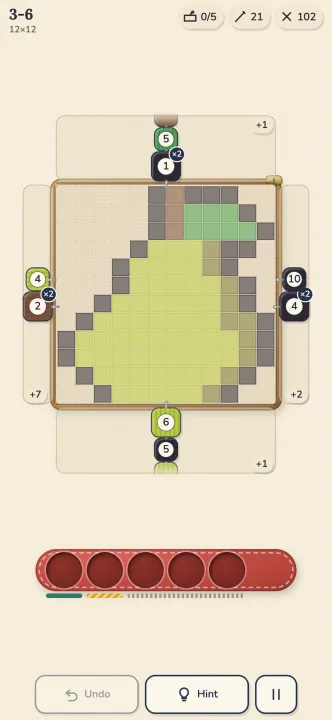
A Twin needle shines when a line has two same-color squares exposed. A Corner needle covers two sides in one tap, which can save a cushion slot. The Round needle is a rare all-purpose tool. The x2 badges in the screenshot above are Twin needles.
Worlds and cloth
| World | Cloth | Size |
|---|---|---|
| 1 | Cotton | 8x8 (tutorials 6x6) |
| 2 | Ramie | 10x10 |
| 3 | Hemp | 12x12 |
| 4 | Silk | 14x14 |
| 5 | Gold thread | 16x16 |
Each world has 20 levels, 100 in all. The next world opens once you clear 14 levels of the current one, and after three losses on a level you can skip it for free, without stars. Some boards have a Small cushion with fewer than 5 slots, and those ask you to look further ahead.
There is also a Daily picture that changes every day. The star rules are the same, and you can retry as often as you like.
Summary
- Only the front two needles of each tray can be tapped, and a needle stitches only the first unstitched square of its own lines, if the color matches.
- Press and hold to preview the target squares before you commit.
- The pincushion has 5 slots. Use it to move things out of the way, but always leave yourself an exit.
- Tidy is the second star and Spotless the third; Spotless needs minimum cushion use with no undo or hint.
- Twin, Corner and Round needles arrive one by one as the worlds go up.
Want to try it? Stitch Hoop runs in your browser, no install needed.
Written by the JWorld team from our game design documents and measured play data, with AI tools helping with the writing.