The exact behavior of all 8 devices from Cushion to Portal, how to find the minimum device count behind the third star, and when to use hints and the free skip.
Putt Workshop is a top-down mini golf puzzle. Most golf games ask for a good swing. Here the first question is where you put the devices. Every hole comes with a device box and dotted placement zones. You place pieces inside a zone, then hit the ball.
The JWorld team wrote this guide from the game's own data and on-screen text. It explains what each of the 8 devices does, how few you need for the third star, and what to tap when you are stuck.
How one hole plays
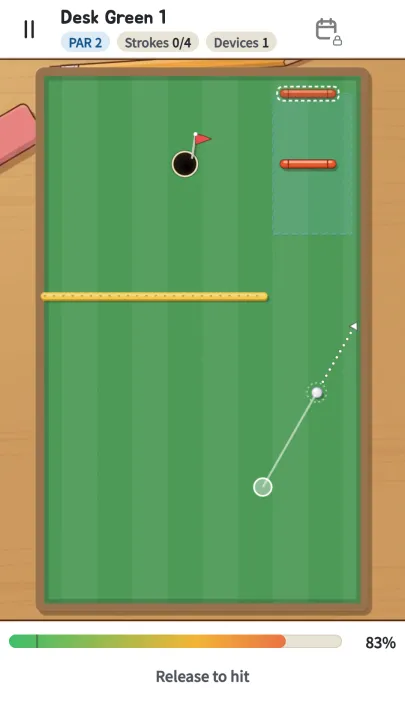
The game opens straight onto a hole, with no home menu. A hole has three steps:
- Place devices. Take a device from the box, drop it in a dotted zone and rotate it if needed. Placing none is allowed.
- Aim. Drag from an empty spot and release. The ball flies the opposite way, and you see an aim line and a power bar.
- Watch. The ball rolls and ends in one of three ways: holed, stopped, or in the water.
It helps to know the three numbers at the top. PAR is the target stroke count. Strokes shows how many you have used out of your maximum. The 0/4 above is par 2 plus 2. If you go over the maximum, an "Out of strokes" sheet appears. You can undo one stroke or restart the hole, and there is no penalty. Devices is how many you have placed.
Once you hit the first stroke, devices lock. Undo back to before the first stroke and you can move them again.
The three stars
Each hole has three stars, and you earn them independently.
| Star | Condition | What it rewards |
|---|---|---|
| ★1 | Hole out within the stroke maximum | Finishing |
| ★2 | Par or better | Accurate shots |
| ★3 | Use no more than the target number of devices | Efficiency |
The ★3 target is the smallest number of devices that still allows par. It is always at least 1, so no hole can be solved with an empty box. Only devices you placed count; pieces left in the box do not. A portal pair is two ends but counts as one device.
The result screen shows strokes and device count together, such as "{s} strokes · {d} devices". If a star is missing, you can see which condition fell short.
What the 8 devices do
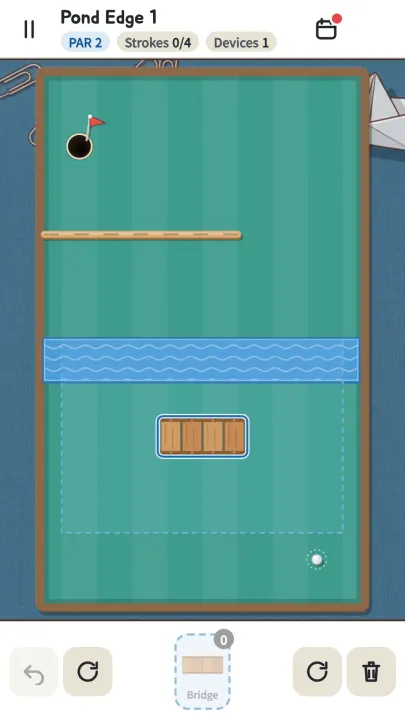
Names and descriptions below are what the game shows. Numbers come from the game's data.
| Device | In-game text | Behavior |
|---|---|---|
| Cushion | Bounces the ball | A bar. It bounces better than a wall, so you lose less speed (wall 0.80, cushion 0.92). Rotates in 8 directions |
| Bumper | Kicks the ball away | A round post. The ball bounces off and gains 80 speed |
| Boost pad | Speeds up a passing ball | Adds +260 speed along the pad, once per entry |
| Bridge | Lets the ball cross water and sand | Turns the water, sand or ice underneath into grass. Slopes stay |
| Ramp | Launches the ball over fences | Enter at speed 140 or more and the ball flies for 0.5 seconds. Slower than that and it just rolls over |
| Magnet | Pulls nearby balls in | Pulls toward the center within a radius of 80, stronger near the middle |
| Spinner | Spins and knocks the ball | A bar that keeps turning. You pick its start phase and direction, and tapping switches clockwise and counter-clockwise |
| Portal | In one end, out the other | Enter A and leave from B at the same speed. The two ends must be placed far apart |
Devices arrive one world at a time. The Cushion appears in the first hole of Desk Green, the Bumper in W1-04, the Boost pad in W2-01, the Bridge in W3-01, the Ramp in W3-04, the Magnet in W4-01, the Spinner in W5-01 and the Portal in W5-04. Holes that introduce a new device are built with a wide margin, so they are a safe place to learn it.
Finding the fewest devices
★3 is a puzzle about restraint: more devices would make it easier, so you remove them on purpose. Try this order.
- Imagine a straight shot with no devices. Find where a wall or water blocks it. That blocked spot is the reason a device exists.
- Give each problem one device. Water in the way calls for a Bridge. A wall corner to get around calls for a Cushion.
- For Cushions, angle is everything. They rotate in 8 directions only, so decide the incoming angle first and fit the piece to it.
- Read the placement zone. Devices only go inside the dotted area. When the zone is small, the answer is nearly decided for you.
- Undo is free. It is unlimited and carries no penalty. The same shot always gives the same result, so nudging the angle a little at a time is the fastest experiment.
When you hit, angle is the bottleneck, not power. A ball moving faster than 330 will roll over the hole, but a ball under 260 that comes within 30 of the cup gets a small pull toward the center. Rough power is fine. Aim accuracy is what decides it.
When you are stuck: hints and skip
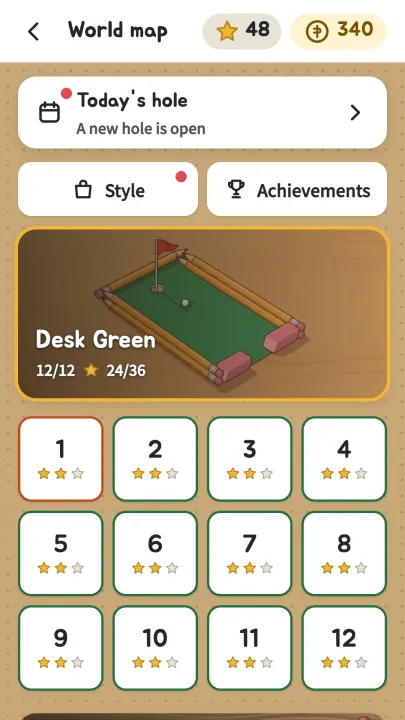
As the map shows, it is common to have two stars on a hole and still miss ★3. These tools help:
- Device hint: shows what to place and where.
- Aim hint: shows the first shot. The game points you to the device hint first.
- Skip: opens after 5 attempts or 120 seconds. You get no stars or coins, but the next hole opens, and there is no limit on how often you use it.
Hints cost an ad view or coins. Following the hint gives a device count that fits the ★3 condition. A hole solved with a hint still counts as cleared, so you can come back later and solve it yourself.
The order worlds open
| World | Name | New elements | Stars to open |
|---|---|---|---|
| W1 | Desk Green | Cushion, Bumper | From the start |
| W2 | Sand Garden | Boost pad, sand | 20 |
| W3 | Pond Edge | Bridge, Ramp, water, fences | 45 |
| W4 | Hill Town | Magnet, slopes, ice | 75 |
| W5 | Gearworks | Spinner, Portal | 105 |
If you are short of stars, go back to an earlier world and fill in ★2 and ★3. Each world has 12 holes, and that is where the star hunt gets its flavor.
Summary
- A hole is place, aim, watch. Devices lock after the first stroke.
- Three separate stars: hole out, par or better, and fewest devices. A portal pair counts as one device.
- The 8 devices are Cushion, Bumper, Boost pad, Bridge, Ramp, Magnet, Spinner and Portal.
- Pick one device per blocked spot, and test angles in small steps. Undo is unlimited.
- Use the hint to check the ★3 target. Skip opens after 5 attempts or 120 seconds.
Ready to try it? You can play on the web, and the game page is here.
Written by the JWorld team from our game design documents and measured play data, with AI tools helping with the writing.