How the JWorld team ships one game to the web, game portals and app stores from the same code. Build modes, platform adapters, ad rules and tests, shown with the real code of Hanpan.
Once a game is finished, there are a lot of places to put it: our own website, game portals, Google Play, the App Store, Toss, ONE store. Each one has its own ad SDK, its own way to save data and its own idea of what the Back key does.
The JWorld team deals with this by pushing every difference out of the game code. This is a dev note on how that works, using the real source of Hanpan, our Janggi and Gomoku game, as the example.
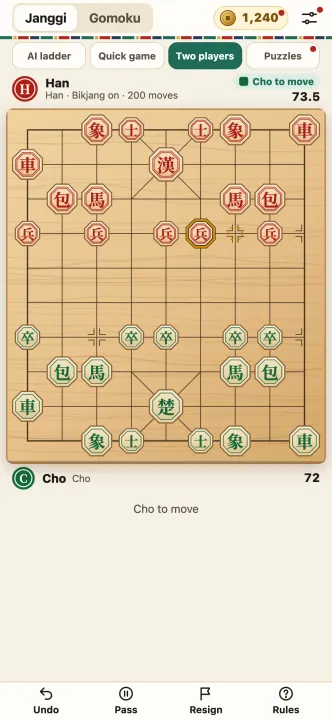
The game code does not know where it runs
Hanpan is built with Vite and TypeScript. The folders split like this.
| Folder | What it does |
|---|---|
src/core | Pure game logic: Janggi and Gomoku rules, the AI, saved progress. No DOM at all |
src/ui and render files | Drawing the board, panels, effects |
src/platform | One adapter per channel |
src/i18n* | The 12 languages of text |
The important part is that src/core is pure. With no screen involved, the rules can be checked from a terminal with node --test. When a channel changes, this folder does not.
The channel is picked at build time
Game code never asks which channel it is on. It imports one name, @platform, and the build config (vite.config.ts) decides which file that name points to.
| Build | Target | Output folder |
|---|---|---|
| default | The web (the games.jworld.dev build adds anonymous play counts) | dist-web |
--mode portal | Web game portals reached through Playgama Bridge | dist-portal |
--mode toss | Apps in Toss | dist |
--mode onestore | ONE store web product | dist-onestore |
--mode play | The Android app (Capacitor); the iOS build uses the same mode | dist-play |
| separate config file | TikTok mini game | dist-tiktok |
Changing the mode gives you a bundle from the same source with a different adapter file swapped in. A side benefit: code that only one channel needs never ends up in another channel's bundle.
What an adapter is responsible for
Every adapter fills in the same Platform interface. These are the pieces Hanpan has.
- Storage:
get,getMany,set,remove. Portals want values read in one batch at startup, which is whygetManyexists. - Rewarded ads:
availableasks whether an ad can be shown right now, andshowshows it. - Interstitial ads: on a channel without full-screen ads this is a function that does nothing.
- Play signals: the first interactive frame (
ready) and the start and stop of a game (gameplayStart,gameplayStop). Portal SDKs listen for these. - Anonymous stats: only switched on in our own site build. On any other host nothing is sent.
There are exactly seven channel names: web, portal, toss, onestore, twa, play and tiktok. The Google Play TWA route simply opens the web build at ?src=twa, so it does not need a bundle of its own.
Ad rules live in one place
Ads differ the most between channels, which makes them the easiest place to cause an incident. Hanpan writes its interstitial rule as pure functions with no DOM and no ad SDK, and tests them. The rule:
- At least 3 counted games so far (a game counts once the player has made 10 or more moves). Never in the first two games.
- At least 3 games since the last interstitial, so at most one in three.
- At least 180 seconds since the last one.
- At least 15 minutes since the first launch.
- Not on a result window where the player watched a rewarded ad.
- Not on "retry" after losing the same level twice in a row.
- Never after a two-player game, on any channel.
Only the portals, the Google Play app and TikTok have full-screen ads at all. On the plain web build, Toss, ONE store and the TWA, nothing is shown even when the rule passes. Rewarded ads are always a bonus, so on a channel where an ad cannot be shown the button is not drawn.
With the rule in one file, adding a channel does not spread "it works like this here and like that there" across the code.
Same game, different Back key
On Android the Back key closes the app. On the web it moves through browser history. Hanpan builds a fake browser history that behaves like Chrome's Back button, then tests the adapter's back behavior against it in back.test.ts. We prefer to catch this kind of channel difference in a test before a person taps through it on a phone.
Twelve languages, outside the adapters
Language is kept apart from channel code too. The list of 12 languages and the rule for choosing one from the browser language live once in apps/shared/i18n, and every game shares them. Hanpan has one file per language, such as i18n-en.ts and i18n-ja.ts; a missing string falls back to English, then Korean. If the host platform reports a language (the adapter's language value), that is followed first.
The languages are Korean, English, Japanese, Simplified and Traditional Chinese, Spanish, Brazilian Portuguese, German, French, Indonesian, Thai and Vietnamese. Store descriptions and screenshots are made in the same 12.
Adding a new channel
- Write one adapter file that fills in the
Platforminterface. - Add one line to the mode table in
vite.config.tswith the adapter and the output folder. - Add a
build:<channel>script topackage.json. - Tell the ad-rule code whether that channel supports interstitials.
- Run the rule tests and the channel tests (
npm test,npm run typecheck).
Game logic (src/core) appears nowhere in those five steps. That is the point: adding a channel should never break a rules test.
Summary
- Game logic sits in
src/core, with no screen and no SDK, and is checked withnode --test. - The channel is chosen by swapping the
@platformadapter through the build mode. - Adapters line up storage, rewarded and interstitial ads, play signals and stats behind one interface.
- Ad rules are pure functions in one place; channels without full-screen ads show nothing.
- Languages are managed once, in a shared folder.
You can play Hanpan in your browser, and its page is at /en/apps/hanpan/.
Written by the JWorld team from our game design documents and measured play data, with AI tools helping with the writing.